Cooking with what I have, using AI only once
A recipe finder built from my own cookbooks. A model reads the books one time, and plain tested code answers every search, offline and for free.
Built with Python and uv, Claude Haiku, SQLite, TypeScript, Preact and Vite, SQLite WASM and a PWA (progressive web app), Netlify Functions
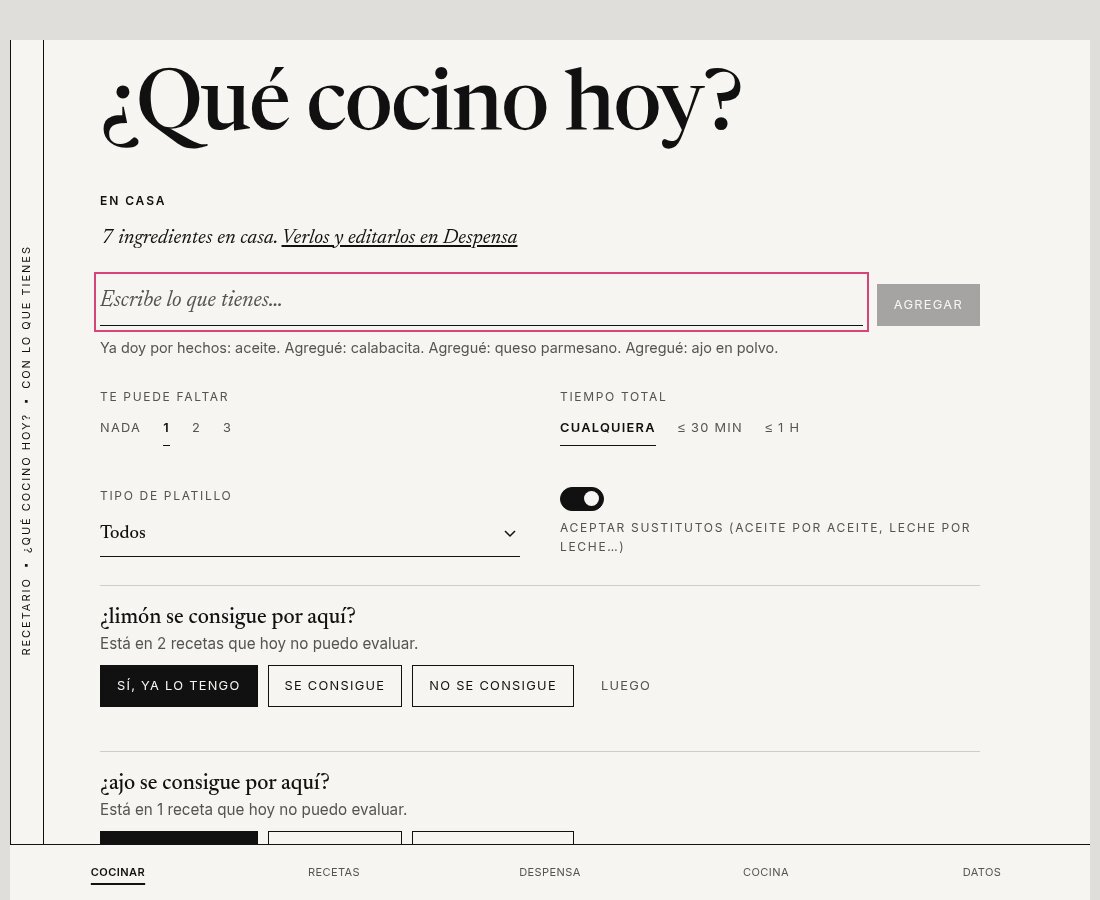
I own a shelf of cookbooks and I still end up asking the same question every evening: what can I cook with what I have at home? A search box on a recipe site doesn’t help, because it finds recipes that sound like my words. I need the opposite. I need recipes where everything I don’t have is a short list, and where nothing needs an oven I don’t own or an ingredient nobody sells where I live. Most recipe books are written for one country and read in another. A cookbook from the United States happily asks for pecans, sour cream or a can of pumpkin, and where I live some of those are hard to find or go by another name.
So I built Recetario. A command line tool reads the cookbooks I own, uses an AI model to pull out each recipe, and writes everything into one SQLite file. A small web app opens that file and tells me what I can cook now, what is one ingredient away, and what to buy. The interesting decision was where the AI goes: it works once, while the books are read. It is not in the search at all.
The books and the recipes made from them stay on my computer, and the repository contains none of them. Every screenshot here uses the ten sample recipes that ship with the code. The app is regional on purpose. It speaks the language and uses the ingredient names of the place where you cook. Mine is set up for Mexican Spanish, but nothing in the design is tied to Mexico, and the section on names below explains how another region would plug in.
At a glance
- My role: design, the data model, the evaluation setup and the review of every result. I used Claude Code to write most of the implementation, working from a design document and milestones I wrote first.
- Timeline: first commit on October 19, 2026. 42 commits in four days.
- Scope: two cookbooks ingested so far, an EPUB with 285 recipes and a PDF with 67. A web app that works offline.
- How: Python for the ingest, SQLite as the contract between the two halves, TypeScript for the app. The model is called at ingestion and for one optional question box.
- New to the terms? There is a glossary at the end.
- Code: the repo is public at jessaimaya/recetario, under the MIT license.
- What I’d point to: the evals, and the places where I decided not to use a model.
Why the model is not in the search
My first idea was the fashionable one: put the recipes in a vector database and let people search by meaning. I rejected it, and the reason is the most useful thing in this project.
“What can I make with eggs and tomatoes, without an oven, missing at most one thing?” is not a question about similarity. It is a question about sets. A recipe either needs the oven or it doesn’t. A similarity search returns the recipes that feel closest, and for this question that is the wrong answer: a recipe that needs one ingredient I can’t buy looks very close to one I can cook tonight.
So the model does the work that needs judgment, once, when a book is read. After that, the data is a normal relational database and the search is plain code with a table of tests. That gives me four things for free: it’s instant, it works offline, it costs nothing per search, and it gives the same answer every time.
The outlined boxes in teal are where a model is called. Everything else is plain code, and the ingest side is the part that took the most care.
The pipeline: rules first, the model where judgment is needed
I wanted the model to do only what rules can’t.
Cutting a book into recipes is rules. My first try matched the numbered list items that start each recipe and found 290 “recipes” in a book of 285, because one recipe used a differently built list. Reading the book’s table of contents instead gave 296 entries: 285 recipes and 11 other things (introductions, bonus pages). A unit counts as a recipe only if its text has an ingredients label and a directions label on lines of their own.
Extraction is the model, then code checks it. The model returns the recipe in a fixed structure. Then plain code verifies it: every ingredient line and every quantity must appear in the original text, there must be at least one ingredient and one step, and times must parse. If something fails, the model gets one retry in which it sees its own answer and the errors. If it still fails, the recipe is marked for review with the problems attached. Run over all 285 recipes of the first book with a simple rule-based answer, these checks raised no false alarms.
Every run can be stopped and resumed. Each stage saves its result keyed by the input, the prompt version and the model. I killed a run halfway on purpose, and the next run finished without redoing anything. It also makes it safe to change a prompt: only the stages after it re-run.
A second book with a different layout needed no prompt change. The first book is an EPUB with a clean table of contents. The second is a 95-page PDF with two-column ingredients and a nutrition table. What made it work was code, not prompting: text in reading order, one recipe per page that has an ingredients label, and titles taken from the printed contents page. It found 67 recipes on exactly the 67 pages the contents lists. I had tried keeping the visual layout first, and the model then needed a retry on 12 of those 67 recipes, because two-column ingredient lists got interleaved. Reading order needed none.
One vocabulary for ingredients, equipment and properties
The hardest part of the project isn’t extraction, it’s names. “Tomato” in an English book and “jitomate” in a Mexican kitchen are the same thing. “Nuez” is pecan in Mexico, while a generic Spanish source says walnut. A recipe that asks for “tomato” should be satisfied by the roma tomatoes at home. Names are regional, and so is availability: a recipe can be perfectly clear and still impossible where you live, because the ingredient is not sold there.
So every ingredient, every piece of equipment and every property name resolves into one shared vocabulary, with aliases and parents. The model’s job is to find the right local name for each term, so the book’s word and the word at your market end up as the same entry.
The second half of the problem is availability. For each ingredient the app keeps a saved answer: it can be bought where you live, it can’t, or nobody has said yet. A recipe that needs something that can’t be bought is hidden for good, so the tool never suggests a dish from the other side of the world. When it doesn’t know, it asks you (“¿se consigue por aquí?”) and remembers the answer. The model finds the name, and you, who live there, decide what the shops near you sell.
This is also how another region would use it. Display names are stored per locale instead of fixed in the table, so a cook in Spain, Colombia or the United States would get their own labels and their own answers about what is available. Only the Mexican Spanish rules ship today. A new region needs its own naming rules and a review pass, and I haven’t tried it yet.
In the vocabulary, a more specific ingredient covers a more general requirement, never the reverse. Resolution runs on the unique terms of a book, not on every line: 285 recipes are about 400 unique ingredient terms.
The model proposes and I decide. The rules I set:
- The model never creates an entry. A new entry is always a proposal that waits for my review.
- A mapping to an existing entry is accepted automatically only at 0.85 confidence or higher, and every automatic decision is still listed for a spot check.
- Fuzzy string matching only supplies candidates to the model. It never accepts anything.
- A rejected proposal is remembered, so the same term is not asked again.
The first run of the ingredient resolver produced 313 open proposals out of 414 terms. That was far too many to review, and when I read them the cause was clear: the rules treated “fresh” and “frozen” as part of the name. Fresh and frozen spinach are one thing you buy, with a different preparation. I threw the whole run away, fixed the normalization and ran it again.
The vocabulary should also get better with every book, and that is measurable. On book one, 28% of the unique terms were already known from my starter list. On book two, 18% were already known, 20% were accepted automatically, 14% had been proposed by book one but not yet decided, and 48% were new. Until I finish the review pass, book one’s proposals don’t count as known, so that third group is really the part that will be known afterwards.
Evals before tuning
One rule shaped the whole project: no prompt change without a measurement before and after it. Each eval has a small set of cases, a score per field, and a table with one row per prompt version and model.
Extraction. I labeled 30 recipes by hand and scored each field: title, ingredient lines, steps, times, equipment. Here is the part that decided my model choice.
| Prompt | Model | Mean score | Cost per recipe |
|---|---|---|---|
| v1 | Claude Haiku | 0.96 | $0.0005 |
| v1 | Claude Sonnet | 0.98 | $0.0093 |
| v2 | Claude Haiku | 0.99 | $0.0005 |
| v2 | Claude Sonnet | 1.00 | $0.0098 |
Haiku with the second prompt costs about 14 cents for a 285-recipe book. Sonnet is slightly better and costs about 20 times more, so Haiku is my default.
I found what to change in the second prompt by comparing outputs, not by guessing. Haiku left out the oven in seven recipes. Sonnet was complete but listed serving platters, cutting boards and trivets as equipment. The second prompt says to list every piece the cook must own once per step that names it, ovens included, and gives an explicit list of things to leave out.
Other models. Because the tool can call any model on OpenRouter, I also ran the same prompt on two cheaper open models, DeepSeek Chat and Qwen3 30B, over 42 recipes from both books, with Haiku as the reference on the same set.
| Model | Equipment precision | Equipment recall | Validator issues per recipe | Cost per recipe | Seconds per recipe |
|---|---|---|---|---|---|
| Claude Haiku | 0.98 | 0.99 | 0.05 | $0.00085 | 5.4 |
| DeepSeek Chat | 0.76 | 0.87 | 0.60 | $0.00078 | 15.4 |
| Qwen3 30B | 0.68 | 0.89 | 0.81 | $0.00028 | 17.2 |
Both open models matched Haiku on titles, ingredient lines and times, and none needed a retry. They fell behind on equipment, which is the judgment call: they listed more things the cook doesn’t need to own, and they triggered the validators 12 to 17 times more often. DeepSeek cost about the same as Haiku here and was three times slower. Qwen was about three times cheaper and also three times slower. The saving is real, but the cleanup lands on my review pass, so Haiku stays the default.
Resolution. 60 public cases: 38 that should map to an existing entry and 22 traps where the model has to propose a new one. The first prompt was 82% correct and the second 92%, with no wrong answer the model was confident about. The change was one rule I wrote after reading the misses: a variety of an ingredient maps to the base entry. I also replayed the results at different confidence cutoffs. No wrong mapping appeared at any cutoff from 0.70 up, so I moved the automatic threshold from 0.90 to 0.85.
Asking in plain words. The optional question box turns a sentence like “algo rápido con huevo y jitomate” into filters. I wrote 20 questions. The first prompt passed 11 of them, and all nine failures were the same mistake: the model used the “ignored” field to narrate what it had already handled, such as “media hora (máximo 30 minutos)”. That field is only for things no filter can express. After I said so, 20 of 20 passed, at about half a cent for the whole set.
What I’d tell you about the numbers
- The second prompt and the 20 of 20 were tuned on the same cases they are scored on, so they are upper bounds. Book two gave fresh terms and the extraction score held, but the sets are small.
- The labels for book two’s golden recipes were drafted by Sonnet and I have not reviewed them. They are not independent of the models, so I don’t report Sonnet’s score on them.
- The four trap misses in the resolution eval are knowledge, not policy: pecan, green onion, sour cream and one of lime or cornstarch that changes between runs. A new entry is never accepted automatically, so each of them reaches my review.
- These are regression checks for my own changes, not benchmarks.
What broke
The translator echoed my hints. The translation step gets the vocabulary names for each recipe, so it uses the same words as the rest of the app. In 146 of about 1,900 ingredient lines, it copied the hint along with the text: “2 tazas de agua [agua]”. No test caught it, because every test checked the line count and the quantities. I found it by reading real recipes in the app. The fix has three layers: the stage strips an echoed bracket, the loader cleans results already saved on disk, and the prompt now forbids it.
A typo in the book itself. One page of the PDF prints “Sodium 361 kcal”. The extraction copies it faithfully, which is correct, and the loader refuses a number whose unit disagrees with its key.
The app: offline, with its reasons shown
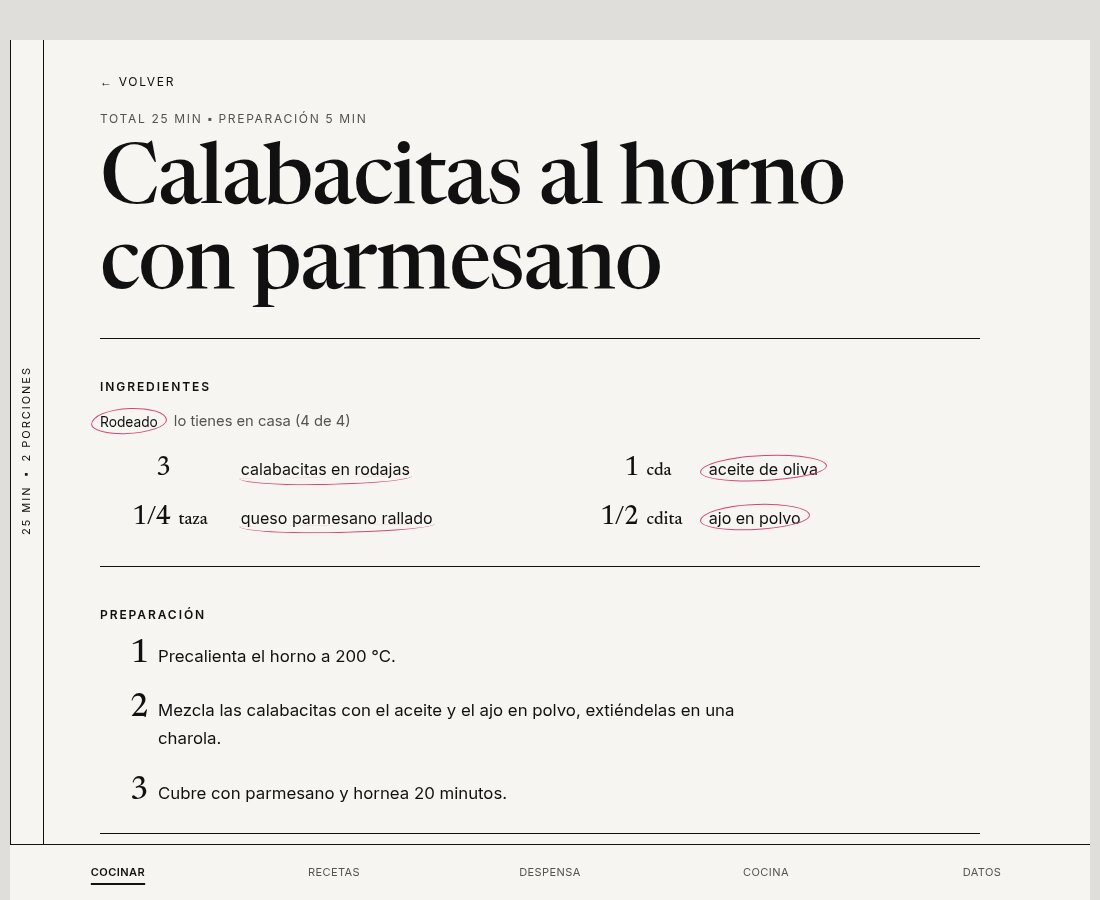
The app is Vite and Preact, with the official SQLite compiled to WebAssembly running in the page. The database file is opened from its bytes and kept in the browser’s IndexedDB, so it works offline and survives a restart. Choosing the main thread and no special storage API means no special server headers, so it can be hosted anywhere. In the recipe screen, the ingredients I have at home are circled, like on a paper copy.
The matching logic is a pure module with no knowledge of SQLite, the page or the model. A few of its rules:
- What I have today beats a saved note that an ingredient is hard to find.
- Anything I exclude beats what I have.
- A more specific ingredient satisfies a more general one, never the other way around, and excluding a parent excludes its children.
- A recipe that needs another recipe, like a pesto, can make it or buy it, whichever is fewer items.
When recipes are left out, a note says how many and why: “4 wait for you to tell me whether the ingredients can be bought here”, “5 need equipment you don’t have”. And it asks the question that would unlock the most recipes: “¿Tienes jitomate?” or “¿Se consigue por aquí?”. My data (what I have, what I can buy, what I own) stays on the device.
Asking in plain words, without leaking a key
The question box sends the sentence to a small Netlify Function, which asks Claude to fill in a form with a tool: the ingredients I have, the ones to exclude, how much may be missing, the maximum time, and what it couldn’t express. The model answers with names, not ids, because ids belong to one database and mean nothing to it. The names are matched against my vocabulary in the browser, so the pantry never leaves the device. The model also never decides which recipes are allowed, and what it couldn’t apply is shown back as “No pude aplicar: sin horno” instead of being guessed.
A public function that spends my money needs guards, in this order: an off switch, an origin check, a limit of 300 characters on the question, 20 questions per visitor per hour, and a daily spending cap computed from the real token usage in each response. The counters live in Netlify Blobs, because a function instance remembers nothing. One known gap: reading and then writing a counter isn’t atomic, so a burst of requests can go a few calls over the cap. At this size I accepted that, and it’s in the notes. The box is also off by default, so a fresh clone can’t spend anything by accident.
What it costs, and the route with no API key
With Claude Haiku through the API, a book of about 70 recipes took roughly five minutes and about 17 cents. A book of about 285 recipes cost about 50 cents. There is a spending cap per run and a --dry-run that estimates the cost without calling a model, and ingest --one-by-one sizes up each book and asks before spending.
I also added a provider that uses the Claude Code command line tool signed in with a Claude plan, so the run needs no API key. Each model call is one isolated process: our own system prompt, no tools, nothing saved, and the API key variables removed from its environment, because otherwise the tool would quietly bill the API instead of the plan. I measured it: the scores matched the API, and an extraction took 5.1 seconds against about 2 over the API. A 285-recipe book takes about an hour and a half that way, against about 35 minutes.
What I’d do next
- Finish my review pass of the proposed ingredient names, then re-run the translation with the final vocabulary.
- Score 20 random translations by hand. The code checks run, but my own spot check isn’t done.
- Check the app on my phone in airplane mode, run the question box through the API route, and deploy a demo that holds only public-domain recipes.
- Later: nutrition estimates from a public food database, substitution ideas limited to what I can buy, and scanned books.
Glossary
Tools and products
- uv: a fast Python package and project manager. It also installs the Python version the project needs.
- Claude Haiku: a small, fast and cheap model from Anthropic. It reads the recipes, resolves names and translates.
- SQLite: a database that is one file. Here it is also the contract between the Python tool and the app.
- SQLite WASM: SQLite compiled to WebAssembly so it runs in the browser.
- PWA (progressive web app): a website that can work offline and be installed like an app.
- Preact and Vite: a small UI library and the tool that builds the app.
- Netlify Functions: small server programs on Netlify. Here one holds the API key for the question box.
Pipeline ideas
- Stage: one step of the ingest, such as extract or translate. Each stage caches its results.
- Artifact: a saved result of one stage. It can be rebuilt, and it is never the source of truth. The database is.
- Segment: the part of a book believed to hold exactly one recipe.
- Vocabulary, entry and alias: the shared catalog of ingredients, equipment and properties. An entry is one item in it, and an alias is any other text that means it.
- Proposal: the model’s suggestion for a new term, waiting for my decision.
- Provenance: where a value came from: the book, the model or me. A value I set myself always wins over a newer one from the model.
- Near miss: a recipe that is missing exactly one thing, or a small number you choose.
- Staple: an ingredient assumed to be at home, like salt, pepper, oil and water.
How I measured it
- Golden set: recipes labeled by hand that every prompt version is scored against.
- Eval: a repeatable run that scores a prompt or model on a set of cases. It is tracked over time, not pass or fail.
- Confident-wrong: an answer the model was sure about and got wrong. It is the worst case, because it would be accepted automatically.
- Trap case: a test case built so that the easy answer is the wrong one.
- Prompt version: a numbered, frozen copy of a prompt, so two versions can be compared fairly.
A personal tool. The books and the recipes made from them are not in the repository, and every screenshot uses the ten sample recipes. Use books you own, for yourself.